
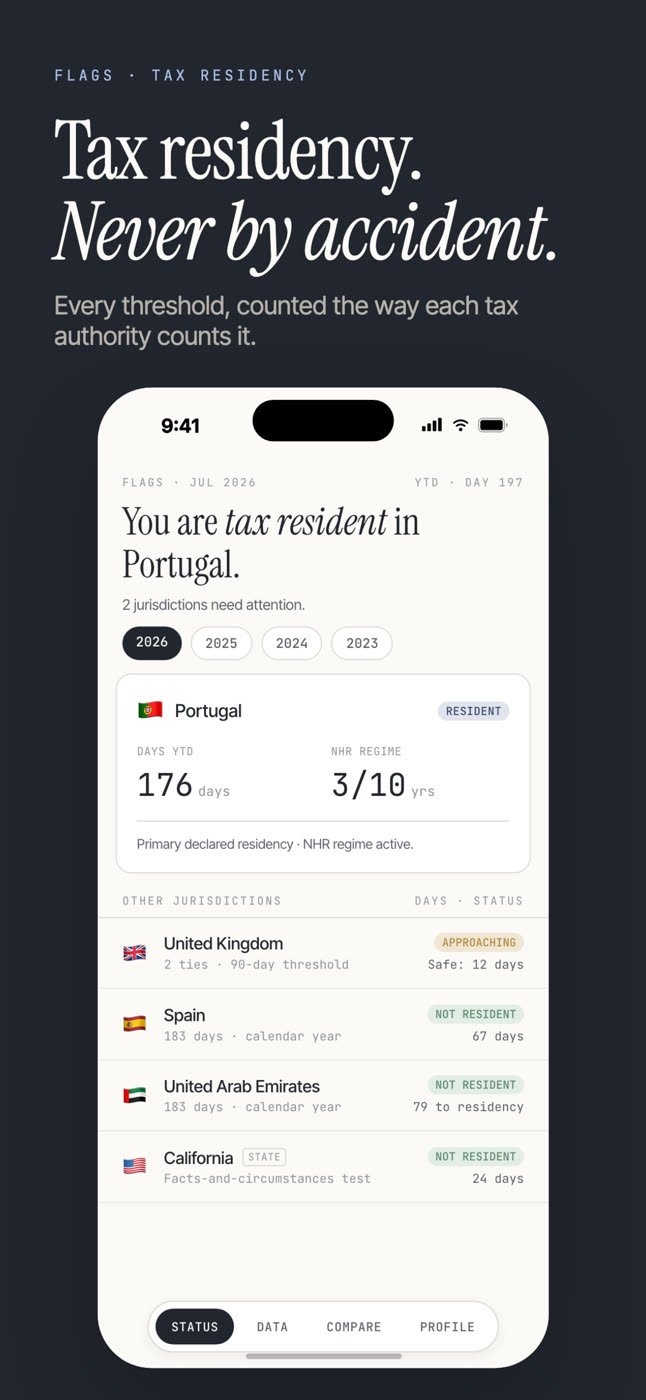
Flags Tax · Count · See · Prove

See your tax in any country.
Prove your days in every one.

Flags counts the days you spend in every country and US state — shows what your tax would look like anywhere — and turns your days into evidence your accountant can use. Read from your photos. No GPS. No account.

Free to download for iPhone. Plans and any trial are shown in the App Store.


The simulator · Your numbers, on your device

Same income. Different answers.

A few more days in a different country — or a different US state — can change what you owe. Flags shows the comparison with your own numbers, then counts the days that decide which answer is yours.

Every rate is earned in days.

  • Estimated tax across the places you actually spend your year — ranked, anchored to your real days, not a fantasy relocation.
  • Roughly 239 countries plus all 50 US states and DC, each on its own tax year and its own counting rule.
  • Indicative rates for planning conversations with your adviser — not advice.
Your year, three waysSimulator
“A few more days changes which line is yours.”
🇬🇧 United Kingdom · resident£112,400
🇵🇹 Portugal · IFICI regime£24,700
🇦🇪 United Arab Emirates£0
Illustrative numbersComputed on iPhone

Free calculators · No signup, nothing uploaded

Am I tax resident yet?

Each calculator answers today with the real rule — then the app keeps counting tomorrow.


The promise · Private by construction

Nothing leaves your iPhone.

No.

No GPS.

We never ask for your location. Travel dates are read locally from photo metadata you already have — never from a tracker following you around.

No.

No Flags cloud.

We run no servers and hold none of your data. If you turn on sync, it uses your own private iCloud — encrypted to your Apple ID, never sent to us — and you can switch it off with one tap.

No.

No login.

No account, no email, no Apple ID handshake. Open the app and it works. Delete the app and it's gone.

Residency is sensitive data, so we built the app that can't see it. Full detail on the privacy page. Short version: the app has no analytics SDK; the website uses limited anonymous PostHog measurement, kept separate from app data.


For your accountant · Evidence, not advice

The proof is your days.

If a tax authority ever asks about a year, it asks in days. Flags keeps every day in your record sourced — photo-confirmed or entered by you — and exports a one-tap, advisor-ready day-count report for any jurisdiction.

Flags is not tax, legal, or financial advice. It is the evidence under the advice: your days, counted the way each authority counts them, ready for the professional who advises you.


From the answers · Sources included

The rules behind the app, written out.

Day-count rules, residency tests, and country-by-country answers — reviewed against primary sources, with the review date on every page.

Browse every answer: tax residency days — or the flag strategy essays.


Common questions · Answered in plain English

The things everyone asks first.

What does Flags: Tax Residency Tracker do?

It rebuilds your country days from your photos in minutes — you confirm every stay — then watches the line for you: the 183-day rule and per-country and US-state thresholds, ranked by risk. It shows a clear verdict (Resident, Not resident, Approaching, Over or Review) before a threshold surprises you; it does not determine tax residence.

How does it count my days without GPS?

It reads the dates already written into your photos to rebuild a travel-day record, then asks you to confirm each stay in two taps — nothing is silently logged. Its App Store listing describes no GPS tracking, account or Flags cloud; you can add or correct missing travel manually.

Which countries and rules does it cover?

It watches roughly 239 countries and jurisdictions plus all 50 US states, including thresholds like the 183-day rule and per-country limits. A jurisdiction-specific day count is not a complete residency conclusion; local legislation, ties and treaty positions can matter, so check the current app for coverage.

Does it handle the UK Statutory Residence Test and ties?

In a simplified form, yes. You can flag where your home, family or work is, and for the UK those ties lower your day limit the way the Statutory Residence Test does. It is deliberately simplified — the full SRT and the US substantial presence test have exceptions the app does not model — so check current HMRC or IRS guidance and obtain advice on a final position.

Can it show what I'd save?

Yes. A built-in savings simulator lets you see roughly what a different residency split could be worth, so a day decision has a number attached. It is an illustration to explore, not a filing figure — confirm any real position with a qualified adviser.

Can I export a report for my accountant?

Yes. Flags is advisor-ready: one tap exports a PDF of your confirmed day counts, drawing on up to five years of history. Keep independent travel documents too, where an adviser or authority needs formal evidence.

Can I keep an eye on it without opening the app?

A home-screen widget keeps your closest threshold and current day count in view, so a quick weekly check-in is enough to catch a line before you cross it — rather than reconstructing a year from memory afterwards.

Does it track more than just days?

Yes — because residency depends on more than days. Flags surfaces home, family and work ties for review, keeps each jurisdiction's own tax year (the UK's 6 April, India's 1 April, Australia's 1 July), and flags countries with a wealth tax on held assets. It still cannot establish the facts or legal outcome a jurisdiction requires.

Can I see previous years?

Yes — Flags keeps up to five years of confirmed history you can review, and the one-tap PDF export puts it in an advisor-ready form. Keep independent travel documents where an adviser or authority needs formal evidence.

Is this tax advice?

No. Flags is an early-warning tool to stop you tipping over a threshold by accident — not legal or tax advice. Residency rules have exceptions the app deliberately keeps simple. Always confirm your position with a qualified tax professional before you act on it.

Is my travel and residency data private?

The current App Store listing describes an on-device design with no GPS tracking, account or cloud storage. Read the privacy policy for the distinction between your app record and limited, aggregate website measurement.

How do I get it, and what does it cost?

The app is available through the App Store. Current pricing, trials and availability vary by storefront, so the live listing is the source of truth before purchase.


Year end · The clocks are running

The 183-day clocks close December 31.

See where you stand in every country before the year decides for you.